Free website speed test
Test your website speed.
Find where to start.
A free check for business websites. See how one page loads on a phone, then choose what to check first.
A real report
See what you will get.
Our homepage, tested on 2 October 2026. Your result will differ.
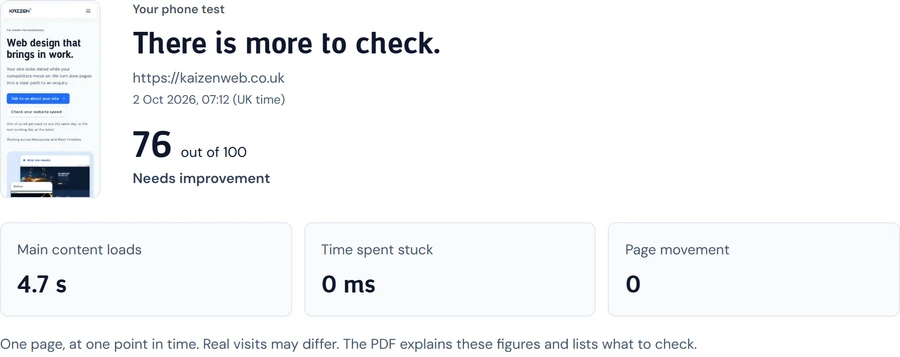
What it measures
See where your page slows down.
Find what to check first.
Time to see the page
How quickly the main content appears.
Can people see what you offer without a long wait? The test checks when the main image or text appears.
A page that stays still
How much the page jumps around while loading.
A moving page can make someone tap the wrong link. The test checks how much content shifts as it loads.
Time spent stuck
How long the page is too busy to respond.
A button should work when you tap it. This test spots delays while the page starts up.
Common questions
Know what your speed test tells you.
Why is my WordPress site so slow?
Large images or extra features can slow a page down. The test helps you find what to check first.
What is a good Google PageSpeed score?
Google calls a score of 90 or more good. It does not promise a place in search results. Real visitors may get different results.
Does website speed affect Google rankings?
Speed is one part of the picture. Google also looks at how well your page answers the search. A high score alone will not put you first.
Why is my mobile score lower than desktop?
The phone test uses a slower connection and less power. It can show delays that a desktop test misses. This tool runs the phone test.
Will I need to give my email address?
You see your score first. If it is below 90, enter your email to see the full report. You can then download it as a PDF. Tips by email are optional.
Does this show what every visitor sees?
No. This is a test of one page at one point in time. Real visits vary by phone, connection and what someone does on the page.
How often should I test my website speed?
Try it after a change, such as adding large images. Run it again to see whether the change helped.
Why did my PageSpeed score drop suddenly?
A new image or feature could make your page slower. Test results also vary between runs. Compare a few runs before you decide what to change.
Next step
Make sense of your report.
Choose what to check next.
We can help you read the report and choose what to fix. Start with a free chat about your site.
One of us will get back to you the same day, or the next working day at the latest.