WordPress vs React: How to Choose for Your Business
Choose a site you can use and look after. Ask to try the editing tools before you agree to a rebuild.

A name on a quote will not tell you how good a site will be. Start with what your business needs and what you want to change yourself.
If you paid a lot for a poor site, ask for proof early. Try real work and ask how your project will be checked.
WordPress and React do different jobs.
WordPress includes tools for writing pages and posts. Its guide to editing a page shows how text and images fit together.
React is used to build the parts of a site people see and use. Its introduction to building pages explains that role. It is one part of a complete website.
A quote that says React still needs to explain how you will edit pages. Ask what else is included, rather than choosing by the name alone.
Try the editor before you choose.
Ask for a demo of a page you will change. Try replacing a photo and adding a blog post. Check whether those jobs are included or cost extra.
WordPress may suit you if its editing tools already meet your needs. You may not need to start again just because the site looks dated.
For a custom build, ask to try the actual editing screen. A polished website does not tell you what editing it feels like.
You can edit your own pages and blog on a Kaizen site. We can also make changes for you. You do not have to learn how to build websites.
Test the pages on a phone.
The choice of tool does not settle how fast a page will feel. The work that goes into the page matters too.
WordPress lists several things that can slow a site down. These include large images and how the site is set up.
Use the same page when comparing test results. Look beyond a score. Can you read the page and use the form while it loads?
Our free website speed check can help you find what needs a closer look. It tests one page at a time.
Compare what the quotes include.
Ask for the work and price in writing. A low starting price may leave out things you need.
- Who moves your existing text and photos?
- How are old page addresses handled?
- Who keeps the site up to date?
- What will future changes cost?
Also ask who keeps a spare copy if something goes wrong. WordPress recommends a backup before an update in its guide to updating a site.
Keep the build price separate from ongoing costs. Our guide to the hidden costs of a website explains what to ask about.
Midland needed a clearer, faster site.
Midland Oil Group supplies oils and greases to businesses. Its old site took more than 8 seconds to load on a phone.
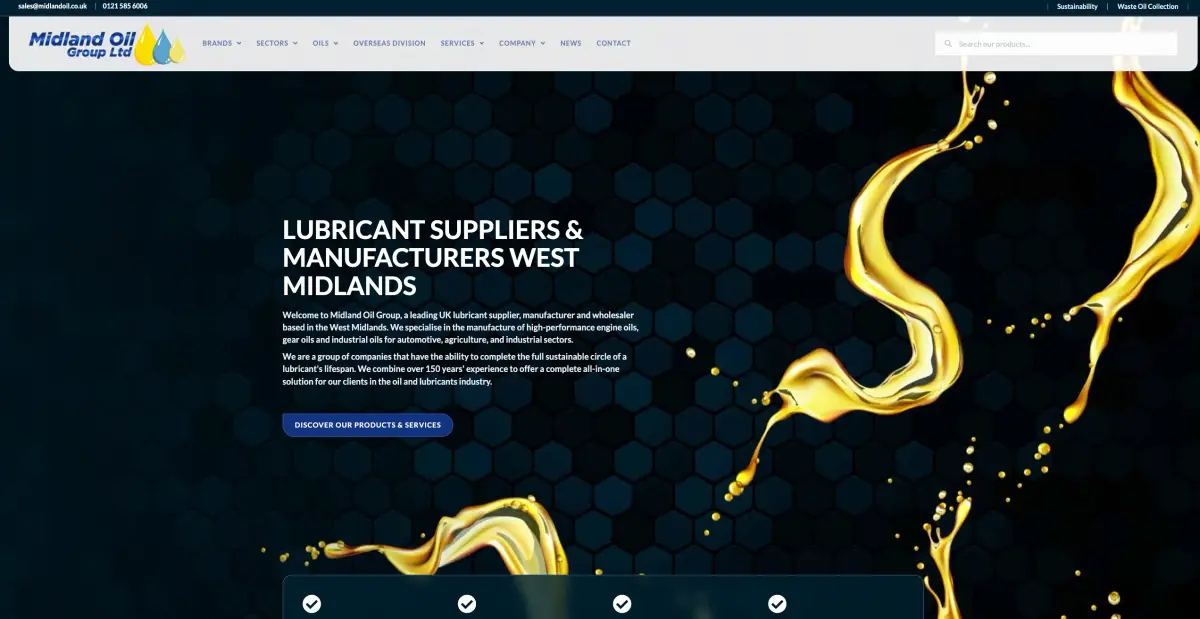
Before the rebuild: Midland Oil's old homepage.
We rebuilt the site with clear product choices. The new pages load in 1.2 seconds. Enquiries tripled in the first month after launch.
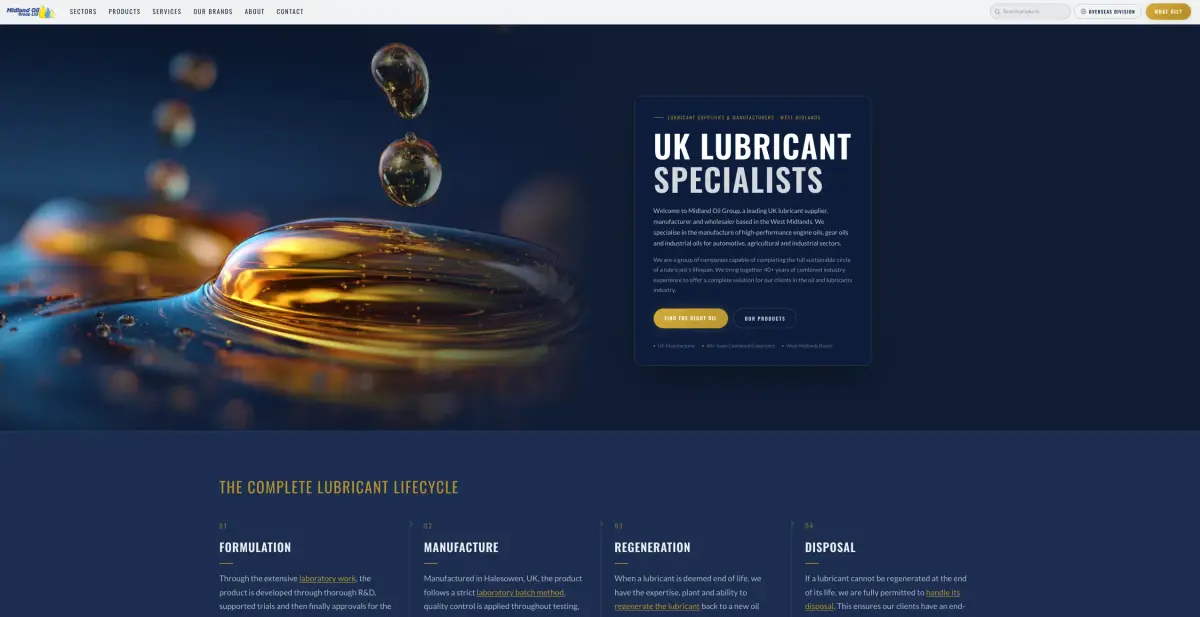
After the rebuild: the new Midland Oil homepage.
That is one client's result, not a promise for every site. It shows why the finished work matters more than the name on a quote.
See what changed on the Midland Oil website.
Start with the site you have.
A few fixes may be enough. A rebuild may make sense if the current site gets in the way of what you need.
Our WordPress website options explain the paths we can discuss with you. For the wider quote, read what a website costs.
Talk to us about your site. The first chat is free. We agree the work and price before you pay a non-refundable deposit.