Hidden Costs of Cheap Websites: What to Check
A low quote can work if it covers what you need. Check the later bills and who looks after the site.

A low price does not tell you whether a website will be good or bad. The useful question is what that price covers.
If you paid for a poor site last time, ask for the details in writing. Check the work you get now and the bills that may follow.
Check the bills after launch.
Ask for a list of costs that repeat. This may include keeping your website address, running the site and looking after it.
For a .uk address, Nominet explains how renewals work. Check when yours needs renewing and what your provider will charge.
Ask whose account holds the address and who receives the reminders. Make sure you can reach that person if you need to move the site.
If a service has a low first-year price, ask what it costs after that. Compare quotes over the same period.
Ask what an edit will cost.
Try a change you will need to make. Replace a photo, update a service or add a blog post.
Ask which changes you can make yourself. Check what help costs and how long you should expect to wait.
On a Kaizen site, you can edit your own pages and blog. We can also make changes for you. Agree what is included before the work starts.
Include care and recovery in the quote.
Ask who keeps the site up to date. Find out who checks it afterwards and who helps if something stops working.
WordPress recommends a backup before an update in its guide to updating a site. Ask who keeps that spare copy and how the site would be restored.
Also ask whether any paid tools need renewing. A quote should make clear which bills you pay and which are included.
Allow for the work inside the pages.
A new look may be only part of the job. Someone still needs to move the text, photos and files you want to keep.
If page addresses change, old links need a route to the right new page. Google's guide to moving website pages explains that work.
Ask whether the quote includes those checks. Do not assume that moving the homepage covers every other page.
Midland needed a clearer way to choose products.
Midland Oil Group's old site made choosing a product hard. We rebuilt the pages around the questions its customers ask.
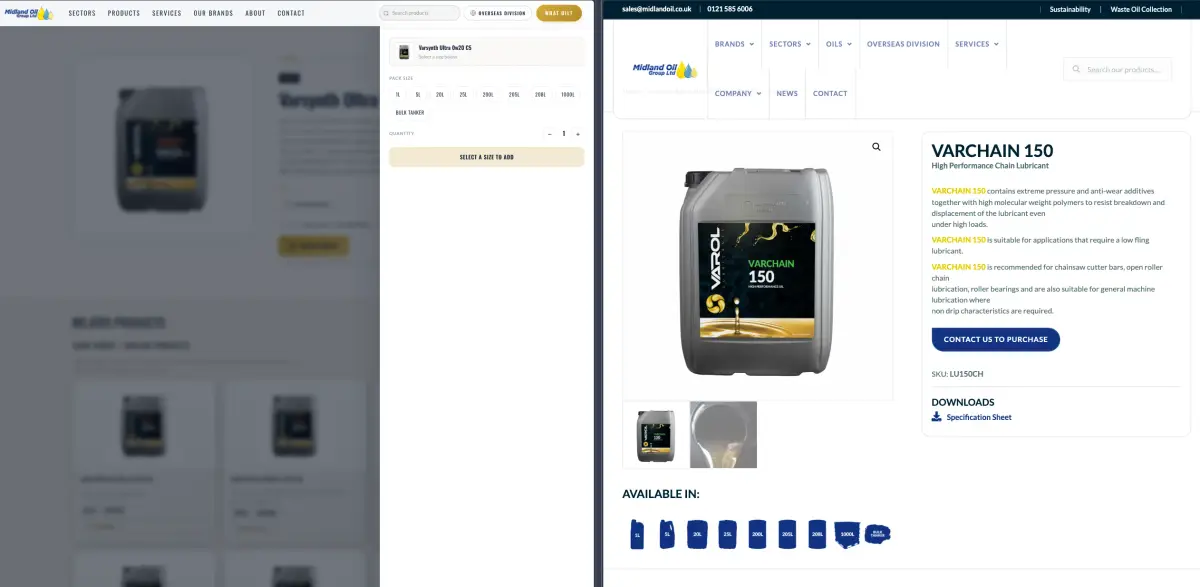
The new size selector is on the left. The old product page is on the right.
That kind of work needs to be part of the agreed plan. A quote for a new look may not cover changes to how customers choose products.
See what changed for Midland Oil. The example shows the work to discuss, not a price you should expect for your own site.
Check the site before paying for more visitors.
Open the pages on a phone. Find a service and try the contact form. Check that the enquiry reaches the right place.
Our free website speed check can help you spot slow pages. A speed score cannot tell you how many sales you have lost.
For the full quote, read what a website costs. Our WordPress website options explain the changes we can discuss with you.
Talk to us about your site. The first chat is free. We agree the work and price before you pay a non-refundable deposit.